


TimelyCare Health & Well-being
4.456.00 Reviews
App Specs
- Version
- 3.0.8
- Updated On
- License
- Free
- Downloads
- 50,000+
- Developer
- Timely Telehealth, LLC
- Categories
- Medical
- Platform
- Android
Screenshots
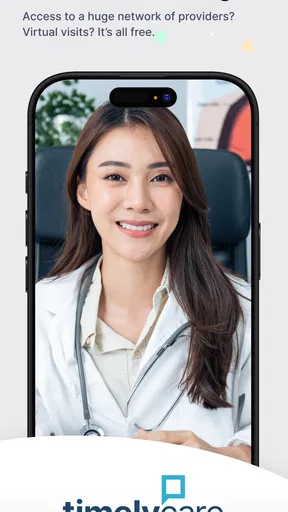
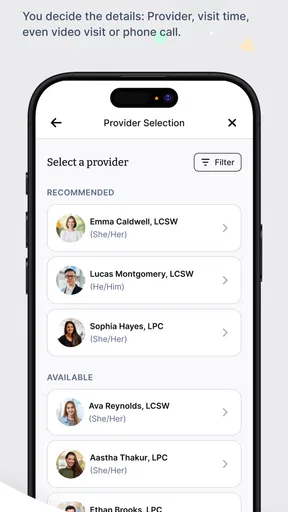
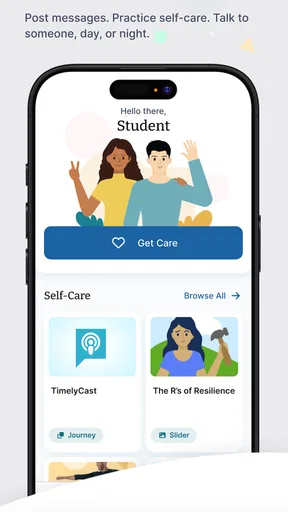
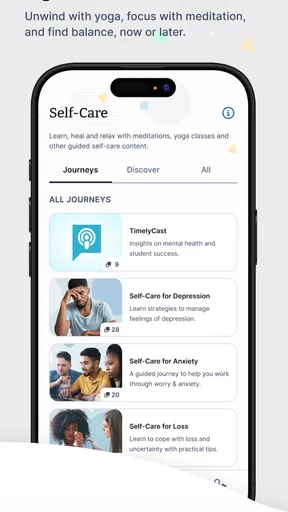
 Analysis by AppCompare
When I need health guidance but do not want to turn a simple concern into a long trip, I look for a service that makes the first step easy. TimelyCare Health & Well-being is built around that situation: it is a free medical app from Timely Telehealth, LLC that aims to connect users with care at any time of day. I found its appeal less in flashy extras and more in the way it can shorten the distance between “I need help” and “I know what to do next.”
That distinction matters. This is not an app I would treat as a replacement for emergency services, a complete medical record, or an in-person clinician. I see it as a convenient front door for non-emergency health support. If you are deciding whether it belongs on your phone, the useful question is not simply whether it offers healthcare access. The better question is whether your usual problem is uncertainty, inconvenience, or a need for a physical examination.
From a health concern to a practical next step
The starting condition is usually ordinary: a symptom appears outside a convenient appointment window, you are unsure whether it deserves a clinic visit, or you want professional guidance before deciding what to do. In that moment, the app’s central promise of round-the-clock access is meaningful. I can imagine opening it late in the evening with a minor but worrying issue, rather than searching random websites and trying to judge which advice applies to me.
Because it is categorized as a medical app and carries an Everyone age rating, it feels aimed at broad everyday use rather than a narrow specialist audience. The free price also removes one obvious barrier to trying the service. That does not make every consultation or care pathway equally suitable, but it does make the initial decision less intimidating: I can explore the service without first committing money to a subscription.
The first practical step is to approach the app with a clear description of the problem. I would prepare the basics before starting: when the issue began, whether it is getting better or worse, what I have already tried, and any relevant medical details I can explain accurately. This preparation is easy to overlook, yet it can make a remote conversation more useful. A clinician can respond to a focused account more effectively than to a vague statement that something “feels wrong.”
What the first interaction is good at
TimelyCare works best when the immediate need is orientation. You may want to understand whether a symptom sounds appropriate for remote care, what kind of professional input makes sense, or whether the next step should be an appointment elsewhere. That is a different job from diagnosing every condition, and I think setting that expectation makes the experience more satisfying.
A useful everyday scenario would be a student or busy worker dealing with a non-emergency concern after normal office hours. Instead of waiting until the next morning simply to ask whether the issue needs attention, the person can use the app as an early point of contact. The outcome may be reassurance, advice to monitor the situation, or a recommendation to seek in-person care. Even when the answer is “you need another kind of appointment,” getting that direction can prevent wasted time.
Worth Reading Before You Choose

EA SPORTS FC Mobile 26 Is a Bigger Football Game, but It Takes Time

Flipboard Shows What News Apps Must Do Beyond the Feed

Switching to Android Auto Means Rethinking Your Driving Routine

Google Calendar Makes a Crowded Week Easier to Manage

Ludo King Makes the Most of the Minutes Between Plans

Baby Panda World Brings Quick Play to Modern Phones, but Its Game Library Feels Busy
I would also use it before a routine visit when I am unsure how urgent the matter is. The app can help turn uncertainty into a more organized plan. That is one of its less obvious strengths: the value is not limited to receiving a final answer. It can help users decide which door to knock on next.
The workflow depends on a clear handoff
Remote care is a chain of handoffs. I begin with my own description, the app guides me toward the appropriate care interaction, and the professional then decides what can reasonably be handled remotely. If the concern needs examination, testing, imaging, or another service that cannot happen through a screen, the handoff moves outside the app.
This is where I think users should be realistic. A smooth digital consultation does not guarantee that the entire health problem will be solved digitally. The app can reduce friction at the beginning, but it cannot remove the physical limits of telehealth. A rash may be discussable through a remote visit, while a serious injury or complex symptom may require direct assessment. The better the user understands that boundary, the less likely the service is to feel disappointing.
I would keep a note of the guidance received during the interaction, especially if the next step involves a primary-care office, pharmacy, urgent-care location, or emergency service. That small habit makes the handoff cleaner. Rather than trying to remember everything later, I can explain what prompted the consultation and what recommendation I received. The app is most useful when it becomes part of a broader care process instead of being treated as an isolated answer machine.
Where it fits beside ordinary alternatives
The usual alternative is calling a clinic, waiting for an appointment, visiting urgent care, or searching symptoms online. Each option has a different trade-off. A clinic may be better when I already know the provider I need or expect a physical examination. Urgent care is more appropriate when the issue cannot comfortably wait and remote guidance is not enough. Search engines are fast, but they often produce a wide range of possibilities without helping me judge which one applies.
TimelyCare sits between those choices. Compared with symptom searching, it offers a path toward professional input rather than leaving me alone with a list of alarming possibilities. Compared with an in-person visit, it can be more convenient for an initial conversation. Compared with calling a familiar clinic, it may be a better fit when normal scheduling is the main obstacle.
That middle position is also its limitation. If I need continuity with a clinician who knows my history, my regular healthcare provider may be the stronger choice. If I need a test, a procedure, or a hands-on examination, convenience cannot compensate for the missing physical setting. I would not choose this app merely because it is easier if the symptoms suggest that remote care is the wrong format.
Small habits that make the experience more useful
My first tip is to separate the urgent question from the background story. Start with what is happening now, how severe it feels, and what changed. Then add context. This helps the professional identify the immediate issue before the conversation becomes crowded with less important details.
My second tip is to treat the encounter as a decision point, not just a chance to obtain a label. Ask yourself what you need to know afterward: whether to monitor, arrange a routine visit, seek prompt in-person care, or change an everyday habit. A consultation is more useful when the desired outcome is practical and specific.
My third tip is to plan the next handoff before ending the interaction. If the recommendation is to contact another provider, write down the reason and the timing. If the advice is to watch for changes, make sure you understand which changes should prompt escalation. This is especially important with remote care because the app may start the process without being the place where the final treatment happens.
A fourth insight is that convenience can encourage overuse. Because access feels easy, I might be tempted to use a remote consultation for every minor uncertainty. That can create unnecessary worry or delay a more suitable appointment. I would use the service for guidance and access, while keeping a clear boundary around symptoms that feel severe, rapidly worsening, or unsafe to manage remotely.
What the app’s public footprint suggests
The app has reached over fifty thousand installs and holds a 4.4 average from around four hundred ratings, with dozens of written reviews. Those figures suggest that it has found a real audience, but I would not read them as proof that every user will have the same experience. Healthcare interactions are highly dependent on the concern, the timing, the available care pathway, and how clearly the situation can be explained.
It was released on December 20, 2020, and the current version is 3.0.8. The listed minimum operating system is Android 7.0, which makes it accessible to many older Android devices. I appreciate that practical reach because a care app is less useful if it assumes everyone owns a recent phone. Still, device compatibility is only one part of the experience; a stable connection, a private place to talk, and enough time to explain the issue matter just as much.
The developer, Timely Telehealth, LLC, has kept the product focused on access to care and well-being rather than turning it into a crowded general-purpose health dashboard. In my view, that focus is helpful. I am less likely to open it expecting exercise tracking, medication management, or a complete personal health archive. I open it for contact with care and direction.
Where the flow breaks down
The first point of friction is the uncertainty that remains before a remote interaction begins. Many users will wonder whether their problem is suitable for telehealth. No app can remove that judgment entirely, and a short description on a phone may not capture the seriousness of a condition. I would rather see the service as a starting filter than as a guarantee that the correct level of care is always obvious.
The second weakness is the handoff itself. If the result is a recommendation to visit another provider, the app has still been useful, but the original problem has not been completed inside the app. Users who expect one continuous journey from symptom to treatment may feel that the experience stops halfway. In reality, that interruption reflects the limits of remote medicine as much as the design of the product.
Privacy and concentration can also affect the quality of a consultation. A person taking a call in a noisy workplace, shared home, or public area may hold back important information. I would choose a private setting whenever possible and avoid rushing through sensitive details. The app cannot create a confidential environment if the user does not have one available.
There is also a human limitation: written or remote communication can make it harder to describe pain, appearance, or changes over time. I would be cautious about relying on the service when the issue is difficult to explain without physical examination. In those cases, an in-person clinician is not an inferior alternative; it is the more appropriate tool.
Who should use it, and who should look elsewhere
I think TimelyCare is a strong fit for people who value convenient access to non-emergency guidance, especially when scheduling or travel is the main barrier. It can also suit users who want help deciding what kind of care to pursue next. The free entry point makes it reasonable to keep available for those moments when a question appears outside a normal routine.
I would recommend looking elsewhere first if you need emergency attention, a physical examination, testing, a procedure, or ongoing care from a clinician who already understands your medical history. Someone who dislikes explaining symptoms remotely may also prefer a local practice. The app is not a shortcut around every healthcare limitation, and using it for the wrong situation could add a delay rather than remove one.
For families, the Everyone rating makes the app feel broadly approachable, but I would still make decisions based on the individual’s symptoms and age rather than assuming remote care is automatically suitable. For older phones, the Android 7.0 minimum is reassuring, although the quality of the consultation will still depend on the device and connection being usable.
My final assessment after following the full journey
What I like most is the way the app addresses the awkward gap between noticing a health concern and knowing which action makes sense. It gives that first step a clearer shape than an internet search, while remaining more convenient than an immediate trip to a clinic for situations that do not obviously require hands-on care.
What I would keep in mind is that the best outcome may be a handoff rather than a complete solution. That is not necessarily a failure. If the app helps me recognize that I need a different provider, understand how quickly I should act, and avoid either panic or neglect, it has done something valuable.
My recommendation is therefore practical rather than unconditional: keep TimelyCare available if you want a free, accessible route to non-emergency health guidance and can describe your concern clearly. Use it as an entry point, prepare for the possibility of follow-up elsewhere, and do not let its convenience delay urgent or hands-on care. For the right starting condition, it can turn uncertainty into a sensible next move.
Pros
- Free virtual care is available to eligible college students.
- Appointments can often be scheduled outside regular campus clinic hours.
- Mental health support is included alongside medical care.
- The app keeps care options and provider access in one place.
- Useful for students studying away from their home campus.
Cons
- Access depends on your school participating in the TimelyCare program.
- Some services may require an appointment rather than instant support.
- Provider availability can vary by time
- location
- and demand.
- It is not intended for emergency medical situations.
- Certain care options may be limited by state licensing rules.
FAQs for TimelyCare Health & Well-being
What is TimelyCare Health & Well-being, and who can use it?
TimelyCare Health & Well-being is a virtual health and wellness platform commonly provided through colleges and universities. It may give eligible students access to services such as on-demand medical visits, scheduled counseling, emotional support, health coaching, and other well-being resources. Availability depends on the institution’s plan, location, enrollment status, and the services enabled for that campus, so users should confirm eligibility before downloading.
What services are available through the TimelyCare app?
The services offered can vary by school, but TimelyCare may include virtual medical consultations, scheduled mental health appointments, on-demand emotional support, psychiatry referrals or visits, self-care content, health coaching, and well-being tools. Some features may operate at different hours or have separate eligibility requirements. After signing in with your school information, the app should display the services currently included in your institution’s program.
Is TimelyCare a replacement for emergency medical or mental health care?
No. TimelyCare is intended for non-emergency virtual health and well-being support and should not replace urgent or specialized care when immediate attention is needed. If you are experiencing a medical emergency, severe symptoms, or an immediate risk of harming yourself or someone else, contact local emergency services or a crisis hotline right away. The app may also provide guidance on finding appropriate in-person care.
How do appointments and virtual visits work in TimelyCare?
After logging in, eligible users can typically choose an available service, review provider availability, and either start an on-demand visit or schedule an appointment. You will generally need a reliable internet connection, a compatible device, and a private place for conversations. Wait times, appointment availability, visit limits, and provider access can differ by campus plan. Keep your profile and contact details updated for smoother communication.
Is TimelyCare free, and what privacy information should users know?
Many colleges and universities provide TimelyCare to eligible students at no additional charge, but coverage, visit limits, and possible fees for certain services are determined by the institution. The app handles sensitive health information, so users should review its privacy policy, permissions, and school-specific terms before using it. Avoid discussing confidential matters in public spaces and use secure login details to protect your account.


